TL;DR: Magnetic wireless charging uses magnets to center the phone over a charging coil, so you avoid constant cable plugging and reduce port wear. For the best results, use a compatible phone or case, keep the charger and case clean, pair the pad with the right power adapter, and manage heat by removing thick or poorly aligned cases when needed.
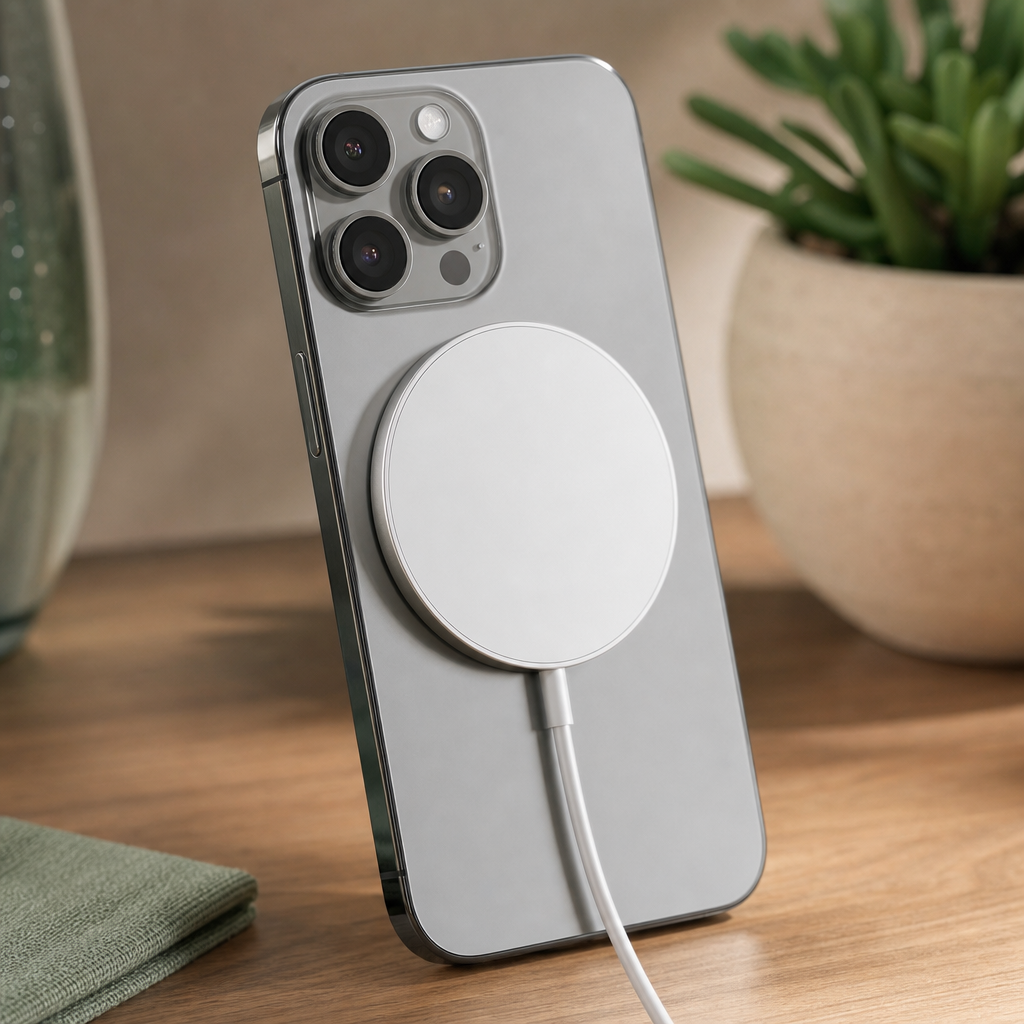
Magnetic wireless charging solves a practical problem: it makes wireless charging easier to line up. A regular wireless pad can charge slowly or stop charging if the phone sits off-center. A magnetic phone charger uses a ring of magnets to pull the phone into the right position over the charging coil, which reduces guesswork, cuts down on cable plugging, and keeps the desktop cleaner.
The key is compatibility. Phones with a built-in magnetic charging ring, and cases with a matching ring, attach more securely and align more consistently. That is why people searching for a mag safe charger for iPhone 12, magsafe charger for iPhone 13, iPhone 12 mag charger, magnetic iPhone charger, magnetic phone charger, or magnetic charging phone are usually trying to solve the same issues: easier alignment, fewer worn ports, steadier charging while using the phone, and less cable clutter. The steps below explain how to set up and maintain a magnetic charging setup without chasing inflated power claims or accepting avoidable heat.
For broader charging and desk-setup picks, see our researched guide to the best phone accessories.
Tools and supplies
- Soft microfiber cloth
- Dry cotton swab
- Small nonmetal pick or soft brush for case edges
- Compatible magnetic wireless charger
- USB-C power adapter that supports the charger’s required protocol
- Compatible phone case with a magnetic ring, if you use a case
- Flat, stable charging surface
Step 1: Identify what makes the charging magnetic
Magnet and wireless charging are two separate parts working together. The magnets do not charge the phone by themselves. The wireless charging coil transfers power through induction, while the magnetic ring helps place the phone in the correct spot over that coil. When the alignment is right, the charger can maintain a steadier connection; when the alignment is poor, the phone may charge slowly, warm up more, or cycle in and out of charging.
This matters most when you use the phone while charging. If the magnets are weak, the phone can shift or detach when you pick it up, rotate it, or answer a call. A proper magnetic wireless charging setup should snap into place with a clear centered feel, not sit loosely on the back of the phone. If the phone slides around on the pad, the case or charger is not providing the alignment you need.
Step 2: Confirm phone and case compatibility
Start with the phone. Recent iPhone models with a magnetic charging ring are the most common match for this charging style, which is why phrases like mag safe charger iPhone, apple magsafe charger for iPhone, and magnetic charger for i phone all point to the same basic category. A non-Apple model is possible, but only if the phone or case has the right magnetic layout and wireless charging support.
Do not assume every case will work just because it is thin. A thin case without a magnetic ring may still weaken the attachment. A thicker case with a properly placed ring can attach more reliably than a slim case with no ring at all. If you use a magnetic wallet, metal plate, pop grip, or ring stand, remove it before charging unless it is specifically designed for this kind of magnetic wireless charging. Metal between the charger and phone can interfere with alignment and can contribute to heat.
If you are trying to adapt a different phone, such as when people search for a samsung magnetic charger, the important questions are simple: does the phone support wireless charging, and does the case provide a centered magnetic ring that matches the charger? If either answer is no, the magnetic hold or the actual charging may disappoint.
Step 3: Set up the power adapter and cable correctly
Magnetic chargers still depend on the power source feeding them. A charger that supports PD charging should be paired with a USB-C PD power adapter. If the adapter is weak or uses the wrong protocol, the phone may still charge, but the real-world speed can fall below what the charger can deliver.
Check that the cable sits fully in the power adapter and charger. A loose USB-C connection can mimic a bad charger: intermittent charging, unexpected disconnects, or slow charging. Avoid running the cable under heavy objects or sharply bending it behind a desk, because strain at the connector can create unreliable power delivery over time.
Power ratings also need context. A charger with up to 15W output can only approach that level when the phone, adapter, cable, temperature, and alignment all cooperate. If the phone is nearly full, warm, or managing battery health, it may draw less power. That does not automatically mean the charger is defective; it means the charging system is protecting the battery and managing heat.
Step 4: Attach the phone and check alignment
Place the charger on a flat surface, then bring the phone down slowly until the magnets pull it into position. The phone should settle into a centered spot without needing to be nudged around. If the charging icon appears and remains steady, the coil alignment is likely good.
Next, pick up the phone gently while it remains attached to the charger. This quick check tells you whether the magnetic hold is strong enough for your habits. If the charger falls off immediately when you lift the phone, the case is likely too thick, lacks the right ring, or has the ring in the wrong position. If the charger stays attached but rotates slightly, that can be normal; if it slides far off-center, charging consistency may suffer.
For bedside use, route the cable so it does not pull the charger sideways. On a desk, leave enough slack for the charger to rest flat. Cable tension is a common reason magnetic chargers seem weak: the magnets may be fine, but the cable is constantly tugging the pad out of alignment.
Step 5: Manage heat before it slows charging
Heat is one of the main reasons a magnetic phone charge feels slower than expected. Wireless charging is less direct than plugging in a cable, and poor alignment or insulating cases can make the phone warmer. When the phone gets warm, it may reduce charging speed to protect the battery.
To reduce heat, remove very thick cases, metal accessories, and anything trapped between the phone and charger. Keep the charging surface open rather than covering the phone with papers, blankets, or a pillow. If you are gaming, recording video, using navigation, or running a hotspot, expect more heat because the phone is consuming power while receiving power.
If the phone becomes uncomfortably warm, take it off the charger and let it cool on a hard surface. Do not put it in a refrigerator or freezer. Sudden temperature changes can create moisture problems, and they do not fix the underlying cause of poor alignment, case interference, or heavy phone use during charging.
Step 6: Clean the charger, case, and phone back
Dust and skin oils do not usually stop magnetic wireless charging by themselves, but they can reduce friction and make the phone slide more easily. They can also keep the charger from sitting flat against the case. Cleaning is quick and helps maintain a secure attachment.
Unplug the charger first. Wipe the charger face with a dry microfiber cloth. If grime remains, lightly dampen the cloth with water, wipe the surface, and let it dry fully before reconnecting power. Use a dry cotton swab around case edges and the camera bump area where lint collects. A nonmetal pick or soft brush can remove debris around raised case rings without scratching the phone or charger.
Do not use abrasive pads, metal tools, or dripping-wet cloths. Avoid spraying cleaner directly onto the charger. Wireless chargers are simple to maintain, but moisture around the cable connector or power adapter can cause a bigger problem than the dirt you were trying to remove.
Step 7: Prevent cable clutter and port wear
One of the best everyday advantages of magnetic chargers is that you stop plugging and unplugging a cable from the phone every time you charge. That reduces wear on the phone’s charging port and makes quick top-ups easier at a desk or nightstand.
Route the charger cable once, then leave it in place. Use the shortest practical path from the power adapter to the charging spot, but avoid tight bends. If the charger lives on a desk, place it where the phone can attach without dragging the cable across the keyboard, mouse pad, or paperwork. If the charger is for a nightstand, keep it away from loose coins, keys, and jewelry so metal objects do not end up between the charger and phone.
A clean setup is also easier to diagnose. When there is only one charger, one cable, and one adapter in the path, slow charging is easier to trace to the case, adapter, heat, or alignment instead of a tangled bundle of unknown cables.
Frequency guidance
After each charging session
Check that the charger detached cleanly and that no accessory, card, or metal object is stuck to the phone or charger. If you notice the phone was unusually warm, review what was running in the background and whether the case was trapping heat.
Weekly
Wipe the charger face and the back of the phone or case with a microfiber cloth. Confirm the charger still snaps to the same centered position. If the magnetic hold feels weaker than usual, remove the case and try again. A stronger connection without the case points to case thickness, case wear, or a misaligned magnetic ring.
Monthly
Inspect the cable, connector, and power adapter. Look for kinks, crushed cable sections, looseness at the USB-C plug, discoloration, or a connector that no longer seats firmly. Also check the case ring area for lifting, cracking, or trapped debris. A small case change can cause a big drop in charging reliability.
When traveling
Pack the charger so the cable is not sharply folded. Keep it away from loose metal items in the bag. Before using it in a hotel, airport, or car adapter, confirm that the power source can support the charger properly; a low-output port may charge slowly even when the magnetic alignment is perfect.
When to replace parts
Replace the phone case when the magnetic hold becomes unreliable, the ring shifts, the case warps, or the phone only charges well with the case removed. Case-related problems are common because thickness and ring placement directly affect both magnetic attachment and coil alignment.
Replace the charger cable or the entire charger assembly if charging cuts in and out when the cable moves, if the connector is loose, or if the charger face is cracked, swollen, or physically damaged. Also replace the power adapter if it gets unusually hot, has a loose port, or cannot maintain a steady connection with other known-good cables.
Replace the charging setup if it no longer meets your normal routine. For example, if you regularly need faster charging at a desk but your current adapter and pad only deliver slow top-ups, move to a setup with the proper PD support and output for your phone. The goal is dependable charging, not just a magnetic click.
Related charging gear
For a simple compact option, our 15W Magnetic Wireless Charger for MagSafe iPhone is a neutral, unbranded M1 magnetic wireless phone charger with wireless charging, magnetic alignment, PD charging protocol support, up to 15W maximum output, 2A output current, and a lightweight 50 g build. It has a minimal no-display design and comes with the magnetic wireless phone charger and packaging box. The price is $10.99.
If you are comparing magnetic chargers for a cleaner workspace, prioritize the same practical traits: secure alignment, correct power adapter support, a case that does not block attachment, and a cable route that stays out of the way. You can also compare broader desk and mobile accessories in our phone accessories roundup.
Related Guides & Products
Frequently Asked Questions
Does the magnet charge the phone?
No. The magnet aligns the phone over the charging coil. The wireless charging coil transfers power, while the magnetic ring helps keep the phone centered.
Why is my magnetic charger slow?
Common causes are a weak power adapter, poor alignment, a thick or incompatible case, heat buildup, or the phone reducing power as the battery fills.
Can a case block magnetic charging?
Yes. A thick case, a case without a matching magnetic ring, or a misaligned ring can weaken attachment and reduce charging consistency.
Should I remove metal accessories before charging?
Yes. Remove metal plates, loose rings, wallets, keys, and other metal items unless the accessory is specifically designed for this charging setup.
How often should I clean the charger?
Wipe the charger and phone or case weekly with a microfiber cloth. Clean sooner if dust, oils, or debris make the phone slide or sit unevenly.
When should I replace the case?
Replace it when the magnetic ring shifts, the case warps, the hold weakens, or the phone charges reliably only when the case is removed.